
CompareUpdated November 23, 2026
OpenMarket vs TradingView
TradingView was built around the candle. OpenMarket is built around what makes the candle: the order book, every trade by side, liquidations and the options chain, on one screen you can script and ask.
No account needed
- Order book heatmap
- Built in
- TradingView: not offered
- Liquidation maps
- Built in
- TradingView: not offered
- Charts on one layout
- 16
- TradingView: 1, or 16 on its top plan
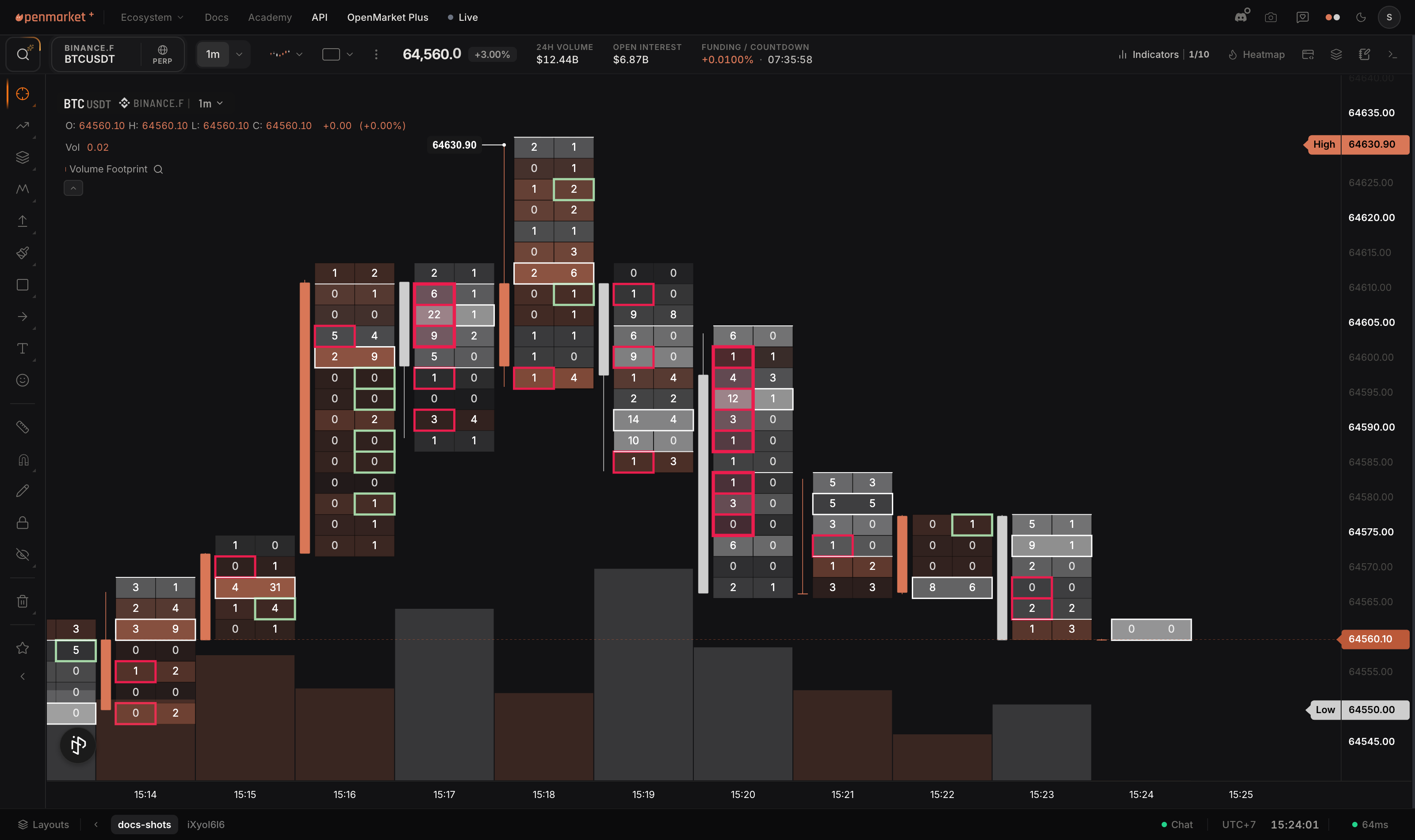
- Footprint and TPO
- Every plan
- TradingView: from its Plus plan
The short answer
What you do on a TradingView chart is all here: drawing tools, indicators, alerts, layouts of up to 16 charts, replay and your own scripts.
What OpenMarket adds is the part TradingView leaves out or estimates: the resting order book, buy and sell volume as the exchange tagged it, and where the liquidations sit.
Tool by tool
Which plan each tool starts on, and what each one reads.
| Tool | OpenMarket | TradingView |
|---|---|---|
| Order book heatmap | Every plan | Not offered |
| Liquidation maps | Every plan | Not offeredIt charts liquidated volume per bar |
| Volume footprint | Every plan | Plus and up |
| TPO (market profile) | Every plan | Plus and up |
| Volume profile | Every plan | Essential and up |
| Buy and sell volume | Tagged by the exchange, trade by tradeOn every plan | Estimated from price movesExchange-tagged on Ultimate only, off by default |
| Charts on one layout | 16 on every plan | 1 on Basic, 16 on Ultimate onlyEssential 2, Plus 4, Premium 8 |
| Scripts that read the order book | Every level, live | Best bid and ask onlyOn tick charts |
| Scripts that read the options chain | Greeks, implied volatility, skew | Not in Pine Script |
| AI that writes your indicator | Kata, built in | AI Copilot, a paid add-onIncluded on Ultimate |
Every market on one screen
- 4,000+crypto perpetuals and spot pairs, 29 venues
- 5,500+US stocks and ETFs
- CME Groupfutures: index, rates, energy, metals
- 7options venues in one chain, crypto and CME
- 1,200+currency pairs, plus gold and silver
- Live oddsprediction markets on rates, elections, events
Scripts: wrun and Pine Script
wrun
Reads the market under the candles: every level of the order book, buy and sell volume as the exchange tagged it, and the live options chain. TypeScript syntax, compiled to run in your browser.
wrun vs Pine, row by rowPine Script
Works from candles. It runs on TradingView's servers and draws lines, labels and boxes on the chart. Of the order book it reads the best bid and ask, on tick charts only, and it has no options chain.
Coming from TradingView
- 1Your watchlists
The watchlist importer reads a TradingView export, or a list you paste.
- 2Your layout
Up to 16 charts in any grid, saved as a workspace.
- 3Your indicators
The classic ones are built in. Describe a custom one and Kata writes it in wrun.
- 4Your broker
Tradovate, NinjaTrader and Rithmic for CME futures. Binance, Bybit and Hyperliquid for crypto.
Plans and prices
Per month in US dollars, billed yearly. On OpenMarket a plan raises limits; live CME and US stock data are add-ons on any plan.
OpenMarket
Every market and every chart type. 16 charts, 200 price alerts.
10 indicators on every chart, seconds charts, the full order book depth, 500 price alerts.
40 indicators a chart, 1,000 price alerts, 500 workspaces.
TradingView
1 chart, 2 indicators, 3 price alerts.
2 charts, 5 indicators, volume profile.
4 charts, 10 indicators, footprint, TPO.
8 charts, 25 indicators, 400 price alerts.
16 charts, 50 indicators, 1,000 price alerts.
Questions
- Can OpenMarket replace TradingView?
- Yes, for US stocks and ETFs, CME futures, crypto, options, forex and prediction markets. Drawing tools, indicators, alerts, layouts, replay and scripts are all here, with the order flow tools TradingView does not offer.
- Does TradingView have an order book heatmap?
- No. Its order flow tools are the volume profile, TPO and the volume footprint. OpenMarket draws the resting order book as a heatmap on every plan.
- Does TradingView have footprint charts?
- Yes, from its Plus plan at $29.95 a month billed yearly. OpenMarket includes them on every plan.
- How much does OpenMarket cost?
- The Free plan covers every market and every chart type. Plus is $35 a month, or $29 a month billed yearly. Max is $119.99 a month, or $99.99 billed yearly. Live CME and US stock data are separate add-ons.
- Can I bring my TradingView watchlists?
- Yes. The watchlist importer reads a TradingView export file, or a list you paste.
- Can I run my Pine Script indicators on OpenMarket?
- Not as they are. OpenMarket indicators are written in wrun. Describe what your script does and Kata, the built-in AI, writes it for you.
See it on a live chart.
Open a heatmap next to your TradingView tab and look at what was missing.
No account needed