Publishing
Publishing turns the wrun indicator in your editor into a versioned package on the OpenMarket registry, under your username, that you, the people you invite, or everyone can add to a chart.
In the editor, Publish opens the Publish Indicator dialog once the current code runs with no errors (until then the editor says "Publish is available once the Indicator has no errors"); you need to be signed in, and the draft is saved first. Whether readers get the code, a compiled module, or neither is the dialog's Code choice, and it also decides where the indicator runs: on OpenMarket's servers, or in each person's browser. Publishing is also how code is reused between indicators: there is no import between them (Reuse and libraries). Who can use it, inviting people and keeping a member list in sync from your own site are the Sharing section.
The Publish Indicator dialog
Publish Indicator
  Name            @yourname/ followed by the name: lowercase letters, digits and dashes
  Version         0.1.0 on the first release; Patch, Minor or Major after that
  What changed    one line people read before they update (from the second version)
  Who can use it  Everyone (Listed on OpenMarket on or off), Invite only, Just me
  Code            Protected, Compiled, Open source
  Description     what this Indicator shows
Cover a picture of this pane, taken now- Name. The scope is your OpenMarket username, lowercased, and the dialog sets it in front of the name; you type only the name part. After the first publish the name is read-only: a rename is a new indicator. The name shown in lists is the editor tab's title.
- Version. The first release is always 0.1.0. Every later publish is Publish a new version: pick Patch, Minor or Major (the dialog starts on the next patch). A published version never changes, so revising an indicator means publishing the next version.
- What changed. From the second version, one line of up to 280 characters that people read before they update.
- Description. What the indicator shows, prefilled from the draft.
- Cover. When the draft is on the active chart, publishing takes a picture of its pane and uses it as the package's cover. There is no picker; without a picture the registry shows a stock one.
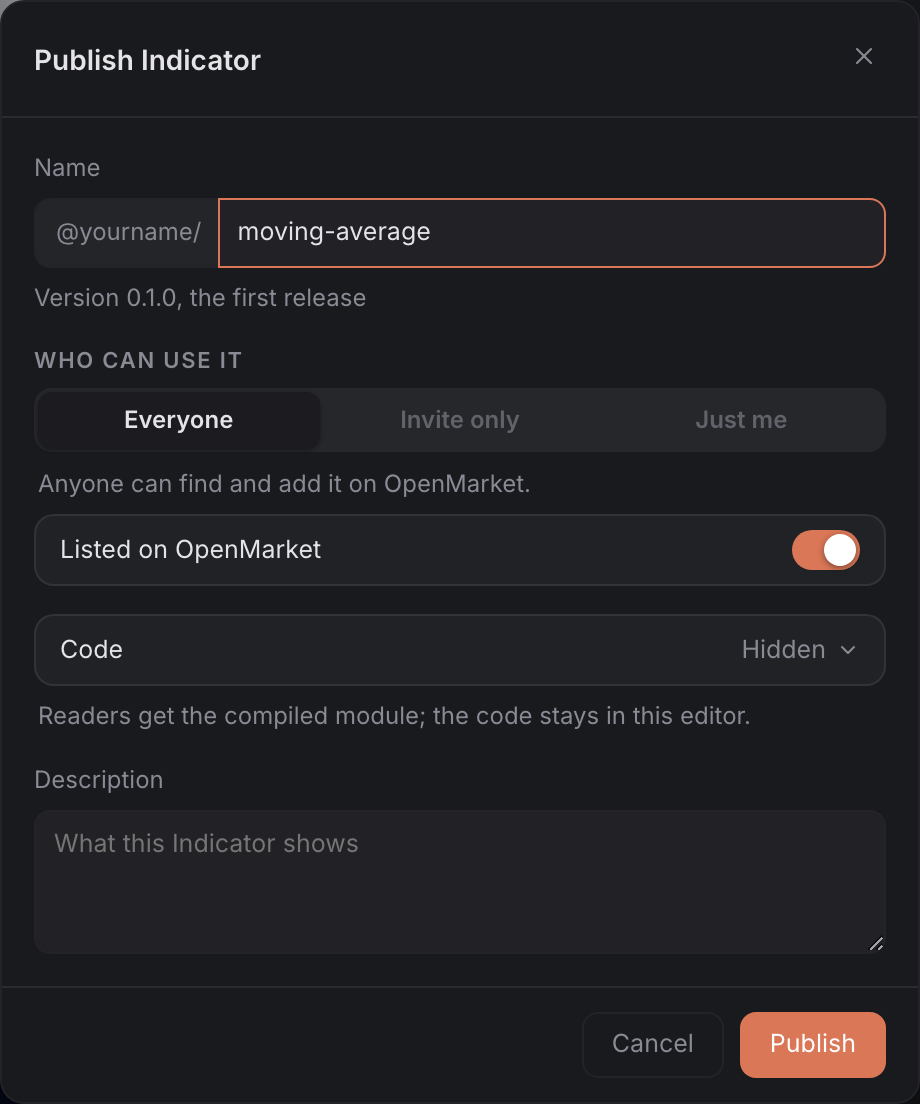
- The scope (
@yourname/) is fixed in front of the name field; the name is prefilled from the tab's title. - "Version 0.1.0, the first release" replaces the version chips until the second publish.
- Everyone is on with Listed on OpenMarket; Invite only and Just me are greyed here because this session was not a direct one.
- Code shows the current choice, with its one-line meaning under the row.
With a direct OpenMarket session the dialog publishes as you on the spot ("Publishing directly as @yourname: no popup."). Otherwise it opens a sign-in window that finishes by itself; if the browser blocks it, the dialog says "The publish window was blocked. Allow popups for this site and try again." A refusal from the registry, such as a version that already exists, reads "Publish failed:" followed by the registry's reason.
Who can use it
Who can use it picks Everyone, Invite only or Just me. A new publish starts on Everyone, listed. Invite only and Just me need a direct OpenMarket session; without one they are greyed out. You can change who can use a published indicator at any time without publishing a new version.
What each choice means, how to invite people, and how to keep a member list in sync from your own site: Sharing.
Code: who reads it and where it runs
| Choice | What the dialog says | Who gets what |
|---|---|---|
| Protected | Runs on OpenMarket servers. Your code never leaves them: nobody can download, read or copy it. | the chart shows the result; nothing of yours downloads |
| Compiled | Runs in each person's browser. They get a compiled module, never your source. | everyone with access downloads the compiled module, and a downloaded module can be copied |
| Open source | Anyone who can use it can read the code and fork it. | everyone with access gets the code, in each person's browser |
- The row opens the three choices; the tick marks the current one.
- The sentence under the row changes with the choice and says who gets the code and where the indicator runs.
- Invite only starts on Protected: the choice for anything you sell. Only Protected keeps the code on OpenMarket's servers; a Compiled module is downloaded by everyone with access and can be copied. Invite only greys out Open source ("Invite only keeps the code private.").
A Protected indicator is marked Protected in the Indicators dialog. OpenMarket's servers compute it over the chart's candles and stream the result to the chart; its settings dialog is the file's own (a source, timeframe or symbol setting keeps its declared default there for now, and there is no Style page), and it cannot be forked. In the editor, once its current version is published, you can run the published indicator in the cloud instead of in your browser. Protected is free to run for your community within fair use (Fair use). Open source code is capped at 256 KB.
Protected is set at the first publish and cannot change later. A name first published as Compiled or Open source stays in the browser, and a name first published as Protected stays on OpenMarket's servers; Compiled and Open source can alternate from one version to the next. To move an indicator to the other side, publish it under a new name.
After publishing
- Find it. Published wrun indicators are in the chart's Indicators dialog, on its Indicators tab: OpenMarket (the built-in and official indicators), Community, and Mine (yours, drafts included, when you are signed in), with indicators others invited you to under Shared with you. The chart's search finds them too.
- Add it. Add a row, or open it and press Apply. The overlay keeps the exact version it was added at and reloads that version, so a newer publish never changes a chart that already carries the older one.
- Indicator page. In the detail panel, Indicator page opens the package's public page in a new tab.
- Fork. On desktop, Fork copies an Open source indicator's code into a new draft in your editor, and publishing the draft records "Forked from" the original. A Compiled indicator has nothing to fork ("The author published this Indicator without its source, so there is nothing to fork."), and a Protected indicator offers no Fork.
- Alerts. A published indicator can carry alerts from the chart; a draft cannot (Alerts).
- Invite people. After an Invite only publish, Invite people… on the receipt opens the indicator's People panel (Invite your community).
Manage a published indicator
Manage Indicator, on the indicator's page under Mine in the Indicators dialog, is the owner's place for removal. Delete Indicator removes every version for good, and the name can never be used again. A chart that already carries it keeps an overlay that no longer loads and says so on its legend.
On an Invite only indicator, People · N on the same page opens its People panel: the people with access, the invite link, imports and access keys (Sharing).
Reuse and libraries
Sharing code between wrun indicators is publishing one: the unit of reuse on
OpenMarket is a whole indicator, @yourname/name, that people add to
their charts, and an Open source one can be forked into a new draft in
your editor. There is no source import between indicators, and no
import "@scope/lib" from another indicator's source. Inside one
indicator, shared code is ordinary AssemblyScript in the same file: an
indicator is one file.
Shared code in the one file
Put functions, classes, and constants in the editor tab beside the
declarations and onBar(). One file per indicator: the kit's classes
and functions and the readers and writers Run generates from your
declarations are simply there, with nothing to import, and there is no
second file to import from (a second source file is refused: "one file
per indicator for now: move src/helpers.ts into src/indicator.ts").
A set of normalization helpers, in the indicator that uses them, which
owns the data, the TA objects, and the declarations, beside the kit's
own Sma and Stdev:
param("period", 20, { min: 2, max: 400 });
output("z", line, lower, { color: "#4f8cff", description: "Z-score of the close" });
output("regime", line, lower, { color: "#f59e0b", description: "+1 stretched up, -1 down, 0 inside the band" });

// The shared logic: plain functions and a class, no declarations.
function zscore(sample: f64, mean: f64, dev: f64): f64 {
  if (dev == 0.0) return 0.0;
  return (sample - mean) / dev;
}

// +1 stretched up, -1 stretched down, 0 neutral.
function regime(z: f64, hi: f64, lo: f64): f64 {
  if (z > hi) return 1.0;
  if (z < lo) return -1.0;
  return 0.0;
}

class Band {
  top: f64;
  bottom: f64;

  constructor(top: f64, bottom: f64) {
    this.top = top;
    this.bottom = bottom;
  }

  contains(price: f64): bool {
    return price <= this.top && price >= this.bottom;
  }
}

let sma = new Sma(20);
let stdev = new Stdev(20);

function onStart(): void {
  sma = new Sma(i32(p_period()));
  stdev = new Stdev(i32(p_period()));
}

function onBar(): void {
  const close = bar.close();
  const mean = sma.update(close);
  const dev = stdev.update(close);
  const z = zscore(close, mean, dev);
  const band = new Band(mean + dev, mean - dev);
  if (isNaN(mean) || isNaN(dev)) return;
  out_z(z);
  out_regime(band.contains(z) ? 0.0 : regime(z, 2.0, -2.0));
}
In the editor, open a New indicator tab, paste it in, and press
Run: it builds like any other indicator. Band is a class the
indicator constructs; a function is a function everywhere in the file,
and there are no placement rules.
The new Band(...) on every bar allocates, and the module's runtime
never frees; keep one Band and update its fields when the history is
long (Collections).
Reuse across indicators
What sharing code between indicators looks like on the chart:
| You want | wrun form |
|---|---|
| use another indicator's functions | copy them into your tab, or add that indicator to the chart beside yours as its own overlay |
| a shared type | a class in your tab |
| reuse a series another indicator computed | not on the chart: each indicator runs its own module and cannot read another's outputs, so compute the series in the consumer |
| a draft that resolves live in the editor | the editor builds the current source as you type, and Run puts it on the chart |
| publish an immutable version | Publish in the editor; a published version never changes (The Publish Indicator dialog) |
| pin an exact version | a chart keeps the exact version it added and reloads that version (After publishing) |
| start from someone else's code | Fork (on desktop) copies an Open source indicator's code into a new draft in your editor (After publishing) |
Good to know
- Official indicators publish under
@om-core: they list under OpenMarket with an Official tag. - The dialog has no price. Paid indicators show their price in the listing and cannot be added from the chart.
- On CME markets, community indicators and drafts cannot read CME data; official indicators can.
- The chart publishes to the OpenMarket registry; there is no other registry to choose.