The settings dialog
Declare a setting by its kind and the dialog draws the right control: one page per thing you can declare, in the order you meet them.
One rule
A setting is one declaration users can change without editing code.
param.<kind>(name, default, options?) names the kind of value, and the
overlay's settings dialog on the chart draws the control that kind calls
for: a number field, a toggle, a menu, a color picker, a market button, a
session strip. The value you read once in onStart() drives your logic, and
changing it reruns the indicator over the loaded bars without
recompiling. This is how you ship a configurable indicator: an adjustable
period, a threshold, a multiplier, an on/off switch, a picked market.
param.int("length", 20, { min: 2, max: 200 });
param.bool("show_bands", true);
let n: i32 = 20;
let bands = true;
function onStart(): void { n = i32(p_length()); bands = pb_show_bands(); }
Every kind keeps the contract of plain param(name, default, { required, min, max, description }): a top-level statement, a literal default, and
a generated reader, readable from onStart() on. Plain param(...)
still declares a number field, and a file that uses it runs exactly as
before.
The dialog, labelled
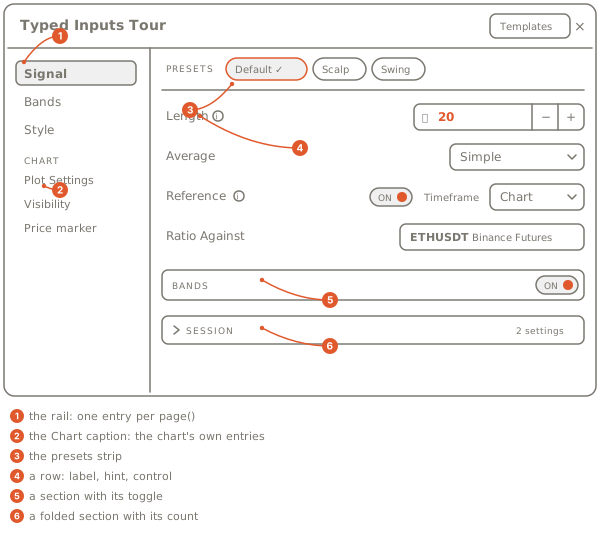
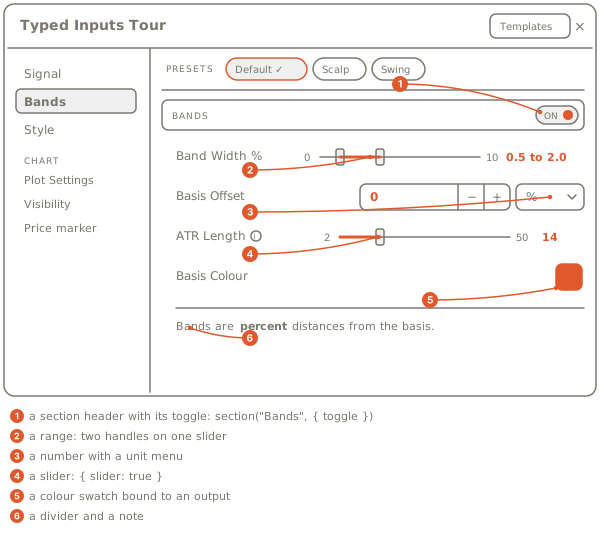
The tour's dialog on its two pages. On the left, the rail: one entry per
page(...), then a Chart caption with the chart's own entries. Across
the top of a page, the presets strip. Below it the rows, grouped by
sections: one carries its toggle in its header, one starts folded with its
row count in the header. Each row is the label, a hint glyph when the
declaration has one, a dot and a reset button once the value differs from
its default, and the control the kind names.
Pages on the rail
page(title) starts a page. Pages are entries in the dialog's left rail,
in order, above a Chart caption that holds the chart's own entries:
the plot settings, visibility and price marker pages follow the pages you
declare. Settings declared before the first page(...) land on
General. A file with no layout word and no group keeps one flat
list. The layout words are on
Pages, sections, dividers, notes.
Rows and their controls
Every param.<kind> you declare is a row, drawn as the control its kind
names (Setting kinds has all fifteen). The row's name is its
label; without one the row shows description, else the name read as
words (show_bands reads "Show Bands"). A hint puts words behind a
small glyph after the label, shown on hover. Rows that name the same
row word share one line of the dialog, and a row whose when toggle is
off is dimmed, or hidden with hide (Options on a setting).
The dialog adds the rest by itself. A row that differs from its default shows a dot and a reset button that names the default, and a dialog with more than twelve settings gets a filter box over every page.
The presets strip
presets({ Name: { setting: value, ... }, ... }) ships named sets of
values with the indicator. The dialog offers them as chips after
Default; picking one fills every setting it names in one step, and
editing a row afterwards shows Custom (Presets).
The Style page
Every output you draw gets a row on the dialog's Style page without a
declaration: visible, width, line style and color for a line; opacity
beside them for an area, and for a column with a static color; visible,
width and color for a mark. A spot the file binds to a setting
(color: "@basis_color") is that setting's row instead, so a look never
has two controls (The Style page).
Browser or cloud
Most settings are numbers the module reads, and every place that runs an
indicator hands them to onStart() the same way: your browser, OpenMarket's
servers for an indicator published as Protected, and
the alerts engine. A setting's value on the chart is the overlay's own,
read once in onStart(): the chart runs every setting from the dialog, or
from the default when none is set, and changing one reruns the indicator
over the loaded bars. An alert on a published indicator runs with the
settings of the overlay you set it from (Alerts).
Three kinds are applied by the chart instead: param.source picks the
field an input reads, and param.timeframe and param.symbol pin an
input. For now the chart applies them only when the indicator runs in
your browser.
| Where the indicator runs | A number, toggle, menu, color, time, price, range, multi, list or session | A source, timeframe or symbol setting |
|---|---|---|
| your browser | read in onStart() from the dialog | applied by the chart |
| OpenMarket's servers | read in onStart() from the dialog | keeps the declared default; the dialog marks the row "Browser lane only for now" |
| the alerts engine | the settings of the overlay you set the alert from | the alert refuses to arm while one is off its default |
An indicator that runs on OpenMarket's servers has no Style page either. The lanes in full, with the picks and the 128-setting cap: Picks, lanes, the cap.
Where to go next
Setting kinds
The fifteen kinds, the control each one draws, the reader each one generates
Options on a setting
label, hint, step, row, when, slider, confirm, and which kind takes which
Pages, sections, dividers, notes
The words that lay the dialog out
Presets
Named sets of values and the chip strip
The Style page
The rows every drawn output gets, and "@name" bindings
Sessions and units
A window in its zone, a number with a unit picker
Picks, lanes, the cap
Time and price picks, the settings the chart applies, the 128-setting cap
What the build checks
Every refusal, on the declaration's line