Labels, tooltips, badges
The words a plot, a text mark or a label answers with: the label's style, the tooltip template, and the badge chips a ladder output turns into.
What it is
style on a text or label renderer picks its look: price_label draws
the price tag on the axis (the one word render.text takes), and a
render.label also takes plain, pill (a rounded chip at the value),
callout (a leader line to its bar) and badge (a dot in the label's
color). tooltip on an output is a template over its own value and any
output or string slot, shown on the legend entry and when the cursor
nears the line; on render.text and render.label it is one per
renderer, shown on its marks. badges names ANOTHER output, a ladder
whose labels become chips on the hover card. style, tooltip, hover
and badges are presentation keys, stripped before the compiler like an
output's.
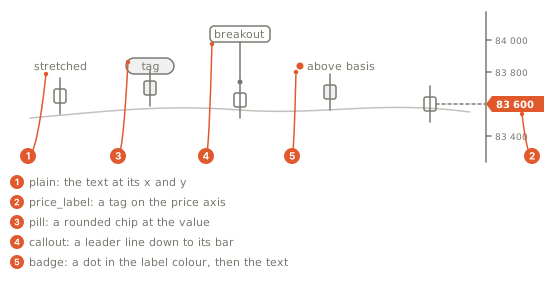
- plain: the words alone, at the label's
xandy. - price_label: a tag on the price axis at the mark's price, the one
style
render.textalso takes. - pill: a rounded chip at the value.
- callout: a chip with a leader line down to its bar.
- badge: a dot in the label's color, then the words.
Declare it
const basis = output("basis", line, overlay, { color: "#2962ff", width: 2, label: "Basis", format: "price", tooltip: "{{label}} {{value:price}}" });
// A text mark on every stretched bar (the slot is left unwritten on quiet bars).
render.text("stretch_mark", { y: "average", text: "readout", color: "#f59e0b", size: 10 });
// One label riding the newest bar, at the average.
render.label("average_tag", { x: "bar_time", y: "average", text: "tag", color: "#38bdf8", size: 11 });
A template placeholder is {{name}} for an output or a string slot,
{{name:format}} with a format from the list (price, %, si, int,
0, 0.0, 0.00, 0.000), {{label}} and {{value}} for the owning
output: "{{label}} {{value:price}} · {{state}}". A price tag on every
signal bar is render.text with style: "price_label": each written
bar's text sits at y as a price tag.
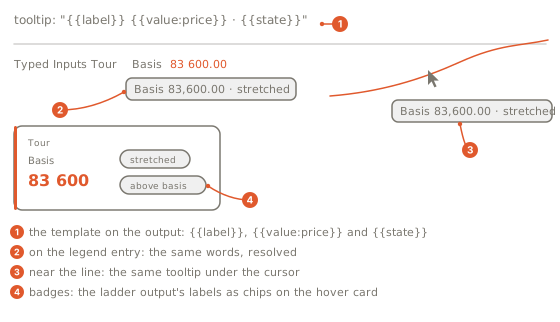
- The template on the output:
{{label}}is the output's label,{{value:price}}its value at the chart's price precision,{{state}}a string slot or another output. - On the legend entry: the same words, resolved on the newest bar.
- Near the line: the same tooltip when the cursor nears the plot.
- Badges: the ladder output named in
badgesturns its labels into chips on the hover card.
What the chart draws
What each surface answers with:
| Surface | Answers with |
|---|---|
| a plot (a line, columns, marks) | its hover blocks; without them its tooltip, else its label and value |
| a legend entry | the output's tooltip, and the output's hover card when the cursor rests on it |
a text mark (render.text) | the renderer's tooltip on its marks, its hover list, its badges; style: "price_label" draws each mark as a price tag |
a label (render.label) | the same, with style one of plain, price_label, pill, callout, badge |
| a HUD tile | the tile again as a hover card |
| a table or a drawing | nothing |
Gotchas
- The pill, callout and badge label styles draw on the next engine pin.
render.texttakesprice_labelonly (nostyleis plain text); a labelstyleoutside the five words is refused.sizeis an integer pixel count, 6..64, onrender.textandrender.label(10reads as small text,16as large); there is no alignment option on renderer text.- An output badging itself is refused;
badgesnames a declared output. - A label has no corner position: it sits at its
xandy, anchored to a bar and a price. A corner readout is a HUD card (HUD cards). - In a template an unknown name stays as written.