Options on a setting
Every kind takes one options object, every key optional, and a key the kind cannot use is refused by name, on the declaration's line.
What it is
An option is one of the dialog's words on a declaration: the row's name,
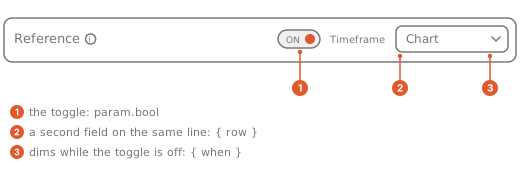
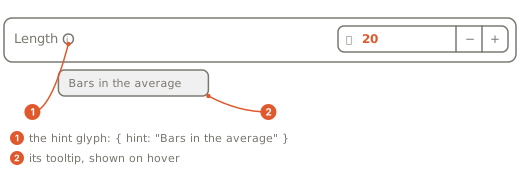
its stepper, a glyph with a tooltip, which rows share a line, which
toggle dims it, where it lands, and the bounds of a number field. Plain
param(...) keeps its four keys, required, min, max and
description; the dialog's words belong to the typed settings,
param.int(...), param.bool(...) and the rest.
Declare it
wrun
// Two fields on one line of the dialog, the first with a hint.
param.int("fast", 9, { min: 1, max: 200, row: "lengths", hint: "Bars in the fast average" });
param.int("slow", 21, { min: 2, max: 400, row: "lengths" });
param.color("slow_color", "#f59e0b", { label: "Color" });
param.bool("smooth", false);
// Dimmed until the toggle it names is on.
param.number("smoothing", 0.3, { min: 0, max: 1, step: 0.05, slider: true, when: "smooth" });| Option | What it does |
|---|---|
label | the row's name in the dialog. Without one the row shows description, else the name read as words (show_bands reads "Show Bands") |
description | the long text of the setting, recorded in the sheet |
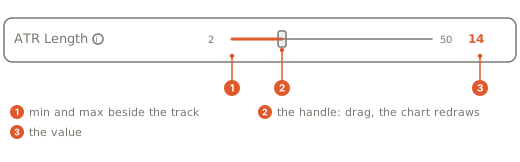
min, max | bounds of a number field: a setting outside them is refused by name before the module runs; required by slider and by param.range; on param.list, max is the most items the list may hold |
step | the stepper's increment and, on int, number and range, the grid a setting sits on, counted from min (or 0 without one): a value off it is refused by name before the module runs. A param.int steps by 1 unless you say otherwise; on price, step is the stepper alone |
slider | true draws a bounded param.int or param.number as a slider |
hint | words behind a small glyph after the label, shown on hover |
row | rows that name the same word share one line of the dialog |
when | the NAME of a param.bool: the row is dimmed while that toggle is off |
hide | with when: hide the row instead of dimming it |
group | "Page" or "Page/Section": where the row lands, shorthand for the layout words (Pages, sections, dividers, notes) |
unit, unit_default | a unit picker beside a number (Sessions and units) |
confirm | marks a setting whose change is worth confirming before it applies (one that refetches); recorded in the sheet, and the dialog applies edits as you make them for now |
required | recorded in the sheet; on the chart a setting always has a value |
tz | param.session only: the zone the window is written in |
Which kind takes which option
| Option | Kinds that take it |
|---|---|
label, description, group, row, hint, when, hide, confirm, required | every typed kind |
min, max, step, slider | the number fields: int, number, price, range |
max | also param.list, as the most items the list may hold |
unit, unit_default | one number field: int, number, price (a range's two ends have no unit picker) |
tz | param.session only |
required, min, max, description | plain param, which takes no other key |
On any other kind they are refused.
What the dialog draws
The dialog adds the rest by itself. A row that differs from its default shows a dot and a reset button that names the default, and a dialog with more than twelve settings gets a filter box over every page.
Gotchas
whenon a setting takes the NAME of aparam.bool;toggleandwhenon asection(...)take the toggle's HANDLE (Pages, sections, dividers, notes).- A key the kind does not take:
param.int options accept only { required, min, max, description, label, step, group, row, hint, when, hide, slider, unit, unit_default, confirm }, not 'tooltip'. - A typed key on plain
param:param options accept only { required, min, max, description }, not 'label'. - A number-field key on a toggle:
param.bool 'x' takes no min option (its value is not a number field). - A unit picker on a range:
param.range 'r' takes no unit option (a unit picker sits beside one number field, not a range). hidewithoutwhen:param.int 'x' declares hide without when; hide names what happens when the when param is off, so declare when beside it.whennaming a setting that is not a toggle:param.int 'x' when names 'y', which is not a param.bool (when takes the NAME of a param.bool, e.g. when: "show_bands").- A slider without both bounds:
param.int 'x' declares slider without min and max (a slider needs both bounds).