Presets
presets({ Name: { setting: value, ... }, ... }) ships named sets of values with the indicator.
What it is
The dialog offers the presets as chips after Default; picking one
fills every setting it names in one step, and editing a row afterwards
shows Custom. Like the layout words, presets(...) is a top-level
statement, sheet-only and compiled to nothing: the module still receives
the same numbers in the same order, and onStart() reads them. The
dialog reads the keys; onStart() reads the numbers.
Declare it
Write each value as you declared it: a number within the setting's
bounds, true or false, a choice's label, a color string, a time in
either spelling, a market as "EXCHANGE:SYMBOL", a text setting's words
within its max_bytes. A range, list, session
or unit is set through its parts (band_pct_lo, rth_start,
offset_unit, by the dialog's words for a session zone or a unit). A
value the setting cannot take is refused on the presets line.
page("Signal");
param.int("period", 14, { min: 2, max: 200, label: "Length" });
param.choice("kind", ["Simple", "Exponential"], "Simple");
const show = param.bool("show_band", true);
section("Band", { toggle: show });
param.range("band_pct", [0.5, 2.0], { min: 0, max: 10, step: 0.1, label: "Band width %" });
param.color("band_color", "#94a3b8");
// The range is set through its two ends.
presets({ Tight: { band_pct_lo: 0.2, band_pct_hi: 1 } });
A moving-average pair ships two presets, each naming a different mix of its settings; picking one fills every setting it names:
presets({ Scalp: { fast: 5, slow: 13, show_slow: true }, Swing: { fast: 20, slow: 50, slow_style: "solid" } });The sheet records presets as [{name, values: {param: number | boolean | string}}], as declared; the chart turns each value into the setting's
own form when a preset is picked.
What the dialog draws
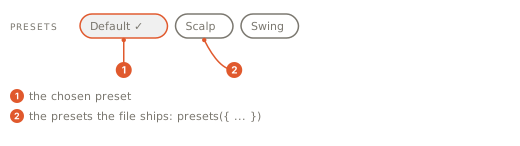
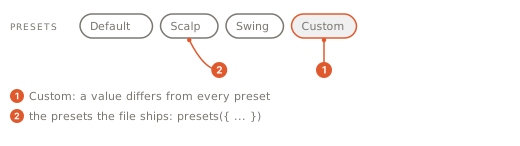
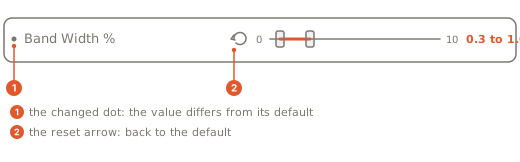
The strip holds a Default chip, one chip per preset, and a Custom chip once the values leave every preset. A row that differs from its default shows a dot and a reset button that names the default.
Gotchas
- A preset names a composite's members, never the composite:
preset 'A' sets 'band', which is not a declared param on the sheet (a composite is set by its members, e.g. band_lo). - A value the setting cannot take is refused on the
presetsline:preset 'A' value for 'mode' takes one of its options as a string (fast, slow), not "Zed". - A choice is set by its label, a market by
"EXCHANGE:SYMBOL", a time in either spelling, a session zone or a unit by the dialog's words for it. - A text setting takes words that fit its
max_bytes:preset 'Fast' value for 'label' takes a string literal (a text setting), not 5andpreset 'Fast' value for 'label' is 70 UTF-8 bytes, over the setting's max_bytes 64.