The Style page
Every output you draw gets a row on the dialog's Style page without a declaration.
What it is
The Style page draws visible, width, line style and color for a line;
opacity beside them for an area, and for a column with a static color;
visible, width and color for a mark. A per-bar ladder keeps its spot: an
output colored by color_by has no color row, one widened by width_by
no width row, and a color_by palette stays the way to switch looks per
bar. The user's changes repaint the output and are saved with the
overlay; the file's values stay the defaults. A spot the file binds to a
setting (color: "@basis_color", line_style: "@style") is that
setting's row instead, so a look never has two controls. Every
render.hud card of the indicator adds a Look row (unless its look
is bound to a setting), and every heatmap whose colour scale reads the
data a Sensitivity row (below).
Declare it
A color the user should pick is a param.color bound by name; a line
style is a param.choice over solid, dashed, dotted:
param.color("fast_color", "#3b82f6", { label: "Fast" });
param.choice("style", ["solid", "dashed", "dotted"], "solid", { label: "Line style" });
output("fast", line, overlay, { color: "@fast_color", line_style: "@style", width: 2 });
A colors palette takes a setting per entry (colors: ["@up", "@down"]),
so a color_by ladder's colors can be the user's too. The same
reference reaches a band, a fill, a box, a segment and a docked profile:
param.color("band_ink", "#94a3b8", { label: "Band" });
param.choice("side", ["right", "left"], "right", { label: "Profile side" });
param.number("width", 0.12, { min: 0.05, max: 0.5, label: "Profile width" });
param.bool("show_poc", false, { label: "Point of control" });
range("band_hi", "band_lo", { color: "@band_ink", edge_line_style: "@style" });
box("zone", { top: hi, bottom: lo, color: "@band_ink", borderStyle: "@style" });
plot.levels({ name: "profile", frame: profile_rows, dock: "@side", color: "@band_ink", width_frac: "@width", poc: "@show_poc" });
An output's other colour words bind the same way: a split line's
up_color and down_color, an area's fill_color, and the entries of a
candle group's border_colors and wick_colors each take a
param.color, so one pair of inks can drive several looks at once.
param.color("up_ink", "#22c55e", { label: "Up" });
param.color("down_ink", "#ef4444", { label: "Down" });
param.color("fill_ink", "#f59e0b", { label: "Fill" });
// One pair of inks drives the split line and the candle group's borders and wicks; the fill ink drives the area's edge and fill.
output("osc", line, lower, { split: "slope", up_color: "@up_ink", down_color: "@down_ink" });
output("cvd", area, lower, { color: "@fill_ink", fill_color: "@fill_ink", fill_opacity: 0.3 });
output("ha_open", candle, overlay, { colors: ["@up_ink", "@down_ink"], border_colors: ["@up_ink", "@down_ink"], wick_colors: ["@up_ink", "@down_ink"] });
output("ha_high", candle, overlay);
output("ha_low", candle, overlay);
output("ha_close", candle, overlay);
A string that starts with @ is a reference to a setting by name. The
build writes the setting's default in its place before it compiles, so
the source compiles to the same module as one that wrote the default
literally, and the sheet records which setting controls the spot. The
places that paint are below; two more pin an input
(Picks, lanes, the cap).
| Where | Names | What the chart does |
|---|---|---|
color: "@name" on an output, a text or label renderer, or a legend entry; an entry of a colors palette | a param.color | paints with the picked color |
line_style: "@name" on an output | a param.choice over solid, dashed, dotted | draws the picked style |
an output's other colour words: fill_color, an entry of fill_colors, fill_gradient or gradient, up_color, down_color, an entry of border_colors or wick_colors | a param.color | paints the fill, the stroke, the split or the candle part with the picked color |
color, an entry of colors or gradient, edge_line_style on a range; color, an entry of colors on a fill | a param.color; a param.choice over the three line styles | paints the band or the fill, dashes its edges |
color, borderColor, an entry of colors or borderColors, borderStyle on a box; color, lineStyle on a segment | a param.color; a param.choice over the three line styles | paints the per-bar shape, dashes its border or stroke |
a style key of plot.levels (color, a series[].color, a gradient stop, dock, width_frac, poc, thickness_px, font_size, label_place and the rest) | a colour key takes a param.color; a word key a param.choice whose every choice is a legal word of that key; a number key a param.number or param.int (an integer key param.int only) whose min..max lies inside the key's range; a boolean key a param.bool | redraws the docked profile with the pick; a structural key (name, frame, panel, beside, offset, unit, a series name) refuses a reference |
every colour word of a panel.* declaration (a series' color and fill_color, positive_color, negative_color, the fill_*_color pair, palette entries and the rest, Panel words) | a param.color | paints the panel with the picked color; a title or a series name keeps an @ as text |
look on a render.hud card | a param.choice whose every choice is a look | draws the card in the picked look; the card gets no Look row (Looks) |
One setting may control several spots. A data-only output (none) has
nothing to paint and refuses a reference (a barcolor output, which paints
the candles, takes one), and so do a draw.* object, a
handles.* default, a tile or block and a HUD card's colours: write a
literal there. Width, opacity and visibility need no setting: the Style
page draws a row for them per output, and a look with no setting bound
to it stays the declaration's (color, width, opacity and
line_style on the output are set in the file). Every other setting is
compute-affecting by construction: it reaches onStart(), and the
indicator reruns over the loaded bars when it changes; a toggle that
hides a line does so by writing NaN to it while it is off.
A setting at an alpha
A colour drawn translucent keeps its translucency when the user picks a new colour: write the alpha after the setting's name, a decimal from 0 to 1.
param.color("bull", "#22c55e", { label: "Bull" });
// The zone's edges at 60 percent and its interior at 20, all from one setting.
output("zone_hi", line, overlay, { color: "@bull/0.6" });
output("zone_lo", line, overlay, { color: "@bull/0.6" });
range("zone_hi", "zone_lo", { color: "@bull/0.2" });
The build writes the setting's default at that alpha in the reference's
place, the colour's own alpha replaced, and records the alpha beside the
spot, so the chart paints every pick at 20 percent there. The default
takes the form the spot holds: rgba(34, 197, 94, 0.2) where the colour
takes rgba() (an output's color and colors, a text, label, shape,
bgcolor or barcolor renderer's colours, a legend entry, a range's colours
and gradient, a fill's color, a box's color and borderColor, a
segment's color, a mini-chart grid's colours), and #22c55e33 where it
takes a colour word (an area's fill_color, a gradient stop, the candle
and split colours, a fill's or a box's ladder, a stats row, a docked
profile or a price canvas, a plot.levels colour, a panel's colours).
A panel series colour is the one spot that binds without an alpha: the
chart reads it as #rrggbb, #rrggbbaa or a theme token and refuses the
panel on the rgba() a recolour at an alpha writes, so write the plain
reference there (a translucent default is #rrggbbaa).
The Look row
Every render.hud card of the indicator gets a Look row, a list of the
twelve looks with "As made" first (the author's own look, or today's
card when the declaration has none). The pick is the viewer's, saved
with the overlay and never written into the sheet; it sits between the
author's look and the words declared beside it, so a declared
corner_radius still wins over the picked look's radius. A second HUD
in the same indicator keeps its own row (HUD cards).
A card whose look the file bound to a setting (look: "@card_look")
gets no Look row: the setting's own row is the look's one control.
The Position row
Under each card's Look row, a Position row says where the viewer moved
the card on the chart ("From the script" until they move it), with a
Reset that puts it back where position and offset place it. Like the
Look pick, the place is the viewer's, saved with the overlay and never
written into the sheet (Moving a card).
The Sensitivity row
Every plot.heatmap whose colour scale reads the data gets a
Sensitivity row: a slider from Subtle to Vivid for how quickly the
colours saturate. Untouched, it sits where the declaration's
auto_quantile puts it (0.98 when absent) and draws exactly that;
toward Vivid the top of the scale comes down so smaller values reach
the bright end, toward Subtle full colour is kept for the largest. The
chart recolours while the slider moves, with no rerun. Like the Look
pick, the setting is the viewer's, saved with the overlay and never
written into the sheet. A heatmap with both ends declared, or a
one-sided one (size, bid, ask, total, buy, sell) with max
declared, has no row; one whose auto_quantile is bound to a setting
(auto_quantile: "@contrast") shows that setting's row instead
(Heatmaps).
What the dialog draws
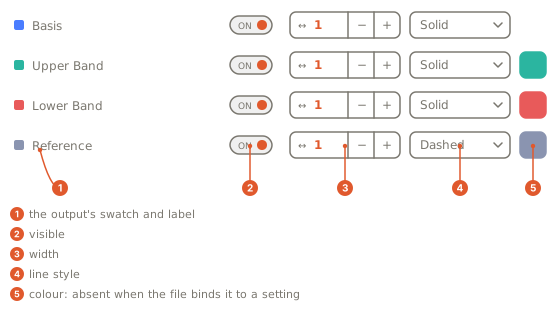
The Style page follows the pages you declare on the rail, one section
per output titled by its label, each with its own reset.
Gotchas
- The Style page is drawn where the indicator runs in the browser; an indicator that runs on OpenMarket's servers keeps the looks the file declares.
- An alpha where it cannot land: on a panel series colour,
panel.bars 'b' series[0].color references "@bull/0.5", but a panel series colour binds without an alpha; on a line style,an alpha belongs to a colour reference; and"@bull/1.5"or"@bull/.4",whose alpha is not a decimal from 0 to 1. - A reference to the wrong kind:
output 'h' color references "@k", which is not a param.color; on aplot.levelskey, aparam.choicewith a word the key refuses, a number setting whose range leaves the key's (width_frac: "@w"withmax: 0.9), a colour setting on a boolean key (poc: "@ink") and a reference on a structural key (panel: "@p") are each refused by name. - A reference where no setting can paint (a
draw.*object, ahandles.*default, a tile): the Console names the declaration and asks for a colour literal there. - A
param.colorread inonStart()throughp_<name>()is the color packed into one number; most files bind it to an output instead.
Related
Setting kinds
param.color and param.choice, the two kinds that paint (param.number, param.int and param.bool join them on a docked profile)
Picks, lanes, the cap
The two references that pin an input, and the lanes
Styling
Every look an output takes, and which looks have no form
Plotting
The outputs the rows are derived from