Picks, lanes, the cap
Two kinds are picked on the chart, three are applied by the chart rather than read by the module, and a sheet holds at most 128 settings.
What it is
param.time draws a date and time field with Pick: the next click on
the chart sets it. param.price draws a number field with Pick: the
next click on the chart sets the price. Three kinds are applied by the
chart instead of being read by the module: param.source picks the field
an input reads, and param.timeframe and param.symbol pin an input.
OpenMarket's cloud accepts at most 128 settings per indicator.
Declare it
// time and price: both can be picked on the chart.
param.time("since", "2024-01-01 00:00", { label: "Start" });
param.price("floor", 0.0, { hint: "0 draws no floor" });
// source: declares the primary input too; in_src() reads the picked field.
param.source("src", ohlcv.close);
// timeframe and symbol: each pins the input that names it.
param.timeframe("htf", "chart", { label: "Reference timeframe" });
input("close_htf", ohlcv.close, { interval: "@htf" });
param.symbol("pair", "BINANCE_FUTURES:ETHUSDT", { label: "Ratio against" });
input("close_pair", ohlcv.close, { symbol: "@pair" });
A param.time default is "YYYY-MM-DD HH:MM" in UTC or a whole number
of epoch seconds. A param.symbol default is "EXCHANGE:SYMBOL" in the
chart's own ids. A param.source default is any word of its menu:
open, high, low, close, hl2, hlc3, ohlc4, volume or
hlcc4 (A blended default).
A blended default
hl2, hlc3, ohlc4 and hlcc4 are blends of the candle, not prices
stored on it: wherever the indicator runs, the bar's own candle is blended
the same way, so a blend is as good a default as close.
| Word | The bar's |
|---|---|
hl2 | (high + low) / 2 |
hlc3 | (high + low + close) / 3 |
ohlc4 | (open + high + low + close) / 4 |
hlcc4 | (high + low + close + close) / 4 |
A blend is missing on a bar where a price it reads is missing. A plain
input may read one too: input("mid", ohlcv.hl2).
// An EMA of the typical price by default: hlc3, a blend of each bar's candle, and any other word of the menu in the dialog.
param.source("src", ohlcv.hlc3, { label: "Price" });
param.int("length", 21, { min: 2, max: 500 });
output("ema", line, overlay, { color: "#f59e0b", width: 2 });

let ema = new Ema(21);

function onStart(): void {
  ema = new Ema(i32(p_length()));
}

function onBar(): void {
  out_ema(ema.update(in_src()));
}A string that starts with @ on an input is a reference to a setting by
name; the build writes the setting's default in its place before it
compiles, and the sheet records which setting controls the pin:
| Where | Names | What the chart does |
|---|---|---|
interval: "@name" on an input | a param.timeframe | pins the input to the picked timeframe; chart removes the pin |
symbol: "@name" on an input | a param.symbol | pins the input to the picked market, exchange included unless the input names one |
ticks_per_bar: "@name" on a volume_ input | a param.int whose min..max lies inside 1..500 | asks for the profile at the setting's bucket size and fetches again when it changes; the chart and the alerts engine both apply it (Order flow) |
The pin rules still hold: a timeframe pick must be coarser than the chart
and a whole multiple of it, which is why a default of "chart" runs on
every interval (Multi-timeframe).
A symbol pin that starts with @ but names no setting is the venue's
own spelling and stays the literal (Hyperliquid spot markets are
"@107"; a param.symbol default may carry one, "HYPERLIQUID:@107").
A pin the user need not change is written on the input itself, on an
input after the first: both halves together for a market, interval on
its own. The chart honors it, and a pin it cannot serve is refused by
name when the indicator runs; on a 1h chart this one reads BTC's closed
4h candles (Multi-timeframe and Multi-source have
the pin rules):
input("btc_4h", ohlcv.close, { symbol: "BTCUSDT", exchange: "BINANCE_FUTURES", interval: "FOUR_HOURS" });What the chart draws
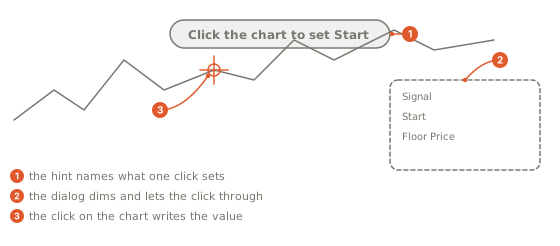
A time or price row's Pick button lets the pointer through the dialog, dims it and shows a hint, "Click the chart to set {label}". The next click on the chart sets the row: the bar's time in epoch seconds for a time, the price under the pointer for a price. A press that travels is a pan, not a pick, and Escape disarms.
Read it in onStart()
p_since() reads the time as epoch seconds and p_floor() the price.
source, timeframe and symbol have no reader to call: the chart
applies the pick, and the input bound to the setting reads the picked
field, timeframe or market per bar.
function onStart(): void {
  since = p_since();
  floorPrice = p_floor();
}

function onBar(): void {
  const t = bar.time();
  const close = in_src();
  const reference = in_close_htf();
  const pair = in_close_pair();
  if (!isFinite(basis) || t < since) return;
}
Where a setting applies
Most settings are numbers the module reads, and every place that runs an
indicator hands them to onStart() the same way: your browser, OpenMarket's
servers for an indicator published as Protected, and
the alerts engine. Three kinds are applied by the chart instead:
param.source picks the field an input reads, and param.timeframe and
param.symbol pin an input. For now the chart applies them only when
the indicator runs in your browser:
- an indicator that runs on OpenMarket's servers keeps the declared default, and its dialog marks the row "Browser lane only for now";
- an alert refuses to arm while one of them is off its default ("Alerts cannot use the Reference timeframe setting yet. Set it back to its default to arm.");
- a
param.sourcedefault runs everywhere, a blend included: every place blends the bar's candle the same way.
An indicator that runs on OpenMarket's servers has no Style page either (The Style page). An alert on a published indicator runs with the settings of the overlay you set it from (Alerts).
The 128-setting cap
OpenMarket's cloud accepts at most 128 settings per indicator, so the build refuses a file whose settings expand past 128, on the declaration that crosses the line. Most kinds count once:
| Declaration | Counts as |
|---|---|
int, number, bool, choice, color, time, price, multi, source, timeframe, symbol, plain param, each market.* | 1 |
a unit list on a number | 1 more |
range | 2 |
session | 3 |
list | max + 1 |
A list is the kind that grows: param.list("lookbacks", [5.0, 20.0], { max: 4 }) draws an editable list of numbers with Add, up to max
long, and counts max slots and the count. A list whose max alone
crosses the cap is refused on its own line: param.list 'l' max 200 would put 201 params on the sheet (max slots and the count); hosted lanes cap params at 128, so max is at most 127.
Gotchas
- A source default off the menu:
unknown field ohlcv.vwap for param.source 's' (known: open, high, low, close, hl2, hlc3, ohlc4, volume, hlcc4). - More than 128 settings:
the sheet would carry 129 params after expansion (a range derives two, a list max + 1, a session three, a unit list one more); hosted lanes cap params at 128. - In a preset, a time is written in either spelling, a price as a number
within its bounds, and a market as
"EXCHANGE:SYMBOL"(Presets).